



 6 / 8
6 / 8

Enabling MapCare in pre cw 45/2013
Discover Media vehicles
Australian model Golf 7 vehicles built prior to calendar week 45, 2013 (04/11/2013) did not have the MapCare option built in. MapCare is
the term used to describe the licensing setup which enables the Discover Media to accept new mapping data for the life of the vehicle (10
updates/5 years).
Early production vehicles can have MapCare retrofitted using the SWaP function to allow mapping updates. Later vehicles will already
accept newer mapping data on the Volkswagen SD card.
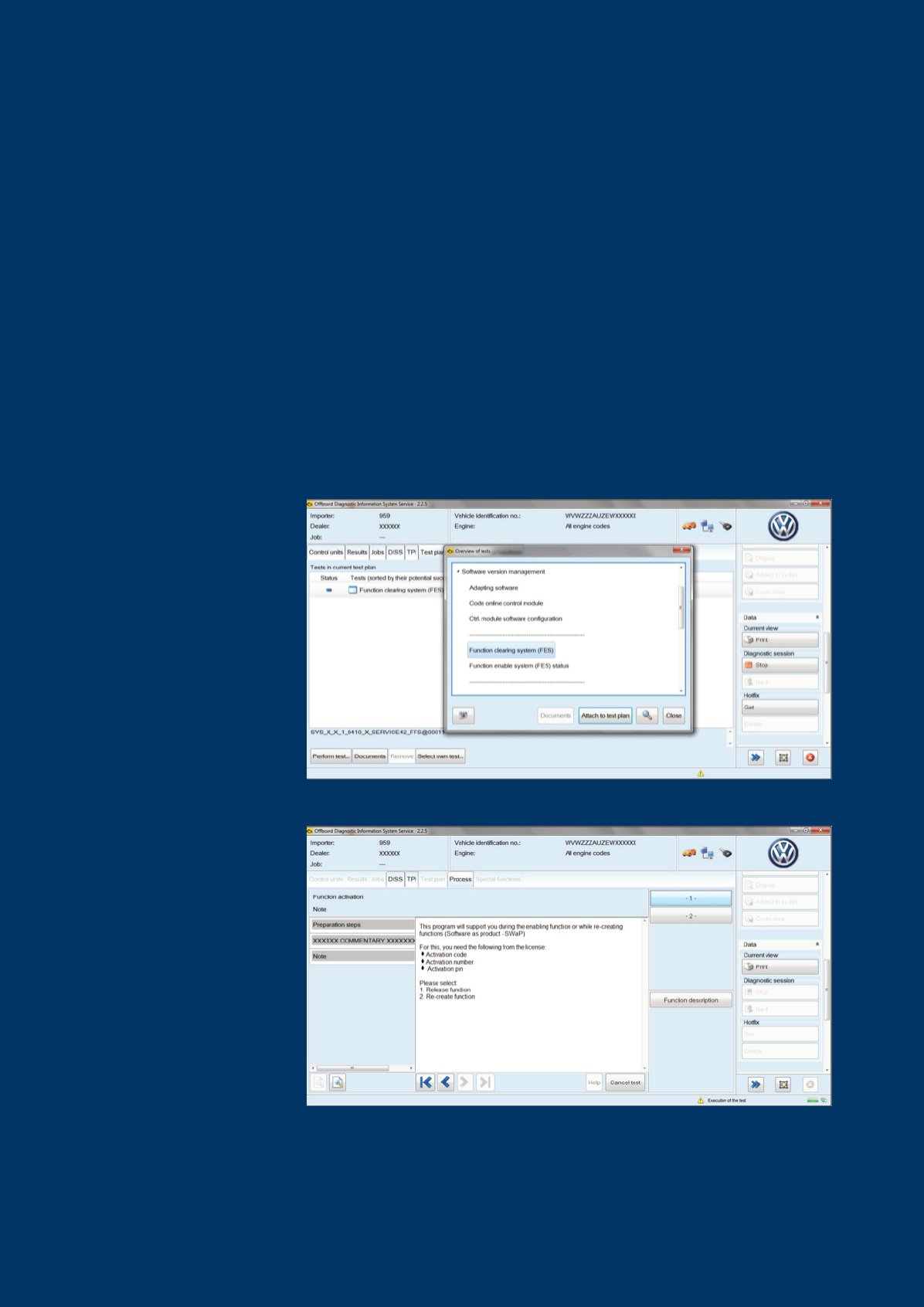
3. The test plan will ask whether you are
releasing a function or re-creating
a function (new control unit). In this
case we are releasing the MapCare
function, so select option 1.
2. Select the TEST PLAN tab and then
SELECT OWN TEST button at the
bottom of the screen. In the pop-up
window, select FUNCTION CLEARING
SYSTEM (FES) under SOFTWARE
VERSION MANAGEMENT, and click
the ATTACH TO TEST PLAN button.
Close this window and perform the
test plan.
Activating MapCare via SWaP
1. Connect a battery charger to the vehicle. Connect the diagnostic machine and run through the diagnosis system scan with Guided Fault
Finding. Work through any pre-existing faults with the vehicle before proceeding with the SWaP activation.